The application is composed in a visual editor and rendered from the result.
A browser-based Application Editor — a palette of 100+ pre-configured components, a canvas with five layout regions (centre, north, south, east, west), and a property panel that wires each component to a database column or to a dataset. Forms, grids, dashboards and reports compose visually; server-side business logic, scheduled jobs and batch processing are authored in the same browser tool against the same repository metadata. Save the artefact; the next request renders the new version. No build, no restart, no redeployment. The role profile required to author the application surface changes accordingly.
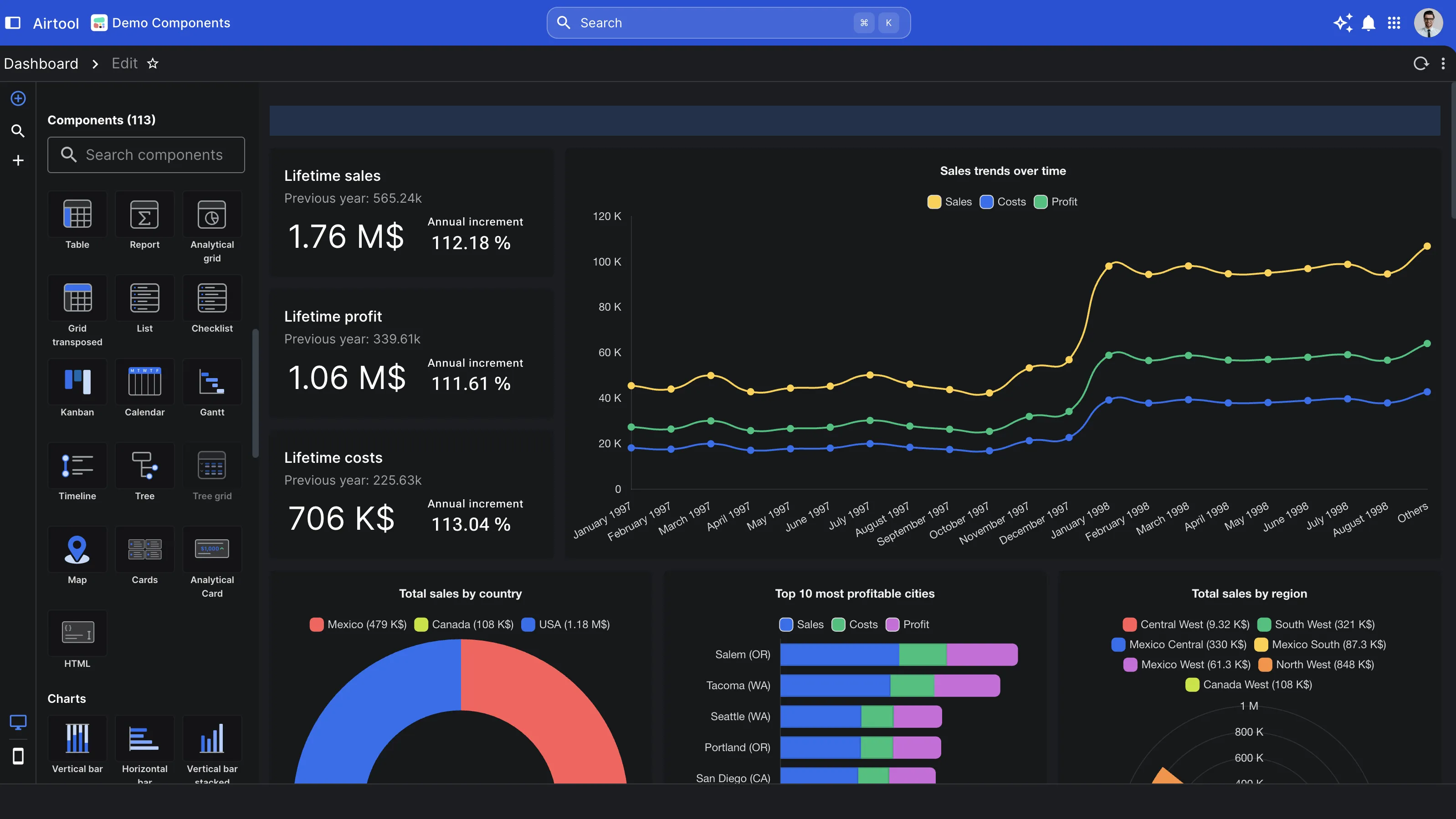
One editor for every artefact
The same browser the user runs the application in is the surface a consultant composes it in — forms, dashboards, reports, server-side scripts, scheduled batches. No local install, no toolchain. Open the editor at a URL, author the artefact, wire it to data, save. The application is authored where it runs.
100+ pre-configured components in the palette
Form composition, text and numeric inputs, select and date inputs, special inputs (colour, file, code editor, terminal), data views (grid, virtual table, tree, master-detail), charts, micro-charts, file and document previews, widgets — organised by category in the editor's component drawer.
Materialises on the next request
Save the form, and the metadata is written to the metadata repository with the cache invalidated cluster-wide. Existing sessions continue with the version they loaded; new users and refreshed sessions render the new version on their next request. No build step. No restart. No maintenance window.
Authored by data-model fluency, not front-end engineering
A consultant fluent in data models and SQL composes the form, wires it to columns, configures the validation, the role-based visibility, the audit trail. Server-side business logic (an invoice-posting batch, a complex period-close) is still authored by engineers in JavaScript or Python — but the front-end work that normally fills a full-stack developer's calendar is structurally absent.
The Application Editor — the visual authoring surface
Component palette, organised by category
The left sidebar is a palette of 100+ pre-configured components, grouped by purpose: form composition (tabs, sections, fieldsets, dynamic forms), text and numeric inputs, select and date inputs, special inputs (file, colour, code editor, embedded terminal), data views, charts and micro-charts, file and document previews, custom widgets. The catalogue is the operational reality of an enterprise application — already inside the editor.
Five-region canvas — centre, north, south, east, west
The canvas exposes five regions: a centre for the principal content, a north for the header band, a south for the footer band, an east for context panels, a west for navigation or related-data lists. Components are placed into the region the layout requires. The form designer thinks in regions; the consultant composes in those regions.
Wire to a column or to a dataset
Each component has a property panel where it is wired to the data it represents — a column from the form's primary table, a dataset returned by a query, a sub-cursor for a master-detail relationship. The component's behaviour follows from the wiring. Components do not have to be coded against the data; they are configured against it.
Foreign-key columns suggest autocomplete by default
When a column is part of a foreign key, the editor recognises the relationship from the metadata repository and suggests the autocomplete widget — a search-as-you-type input bound to the parent table. One click wires the component to the lookup; the platform does the SQL, the caching, the keyboard handling and the audit trail.
The component catalogue — what is in the palette
Form composition and structure
Tabs, sections, accordions, sub-forms, dynamic forms, master-detail layouts, stepper-style multi-page forms. The composition primitives a complex business form actually requires — not just the field-level primitives.
Text, numeric, date and select inputs
The full spectrum of standard inputs — text, textarea, email, password, integer, decimal, currency, percentage, date, time, datetime, select, multi-select, combobox, autocomplete, radio, checkbox, switch, slider, range slider, rating. Each with its own validation rules, formatting, locale-awareness.
Special inputs — file, colour, code, terminal
File upload with progress and preview, colour picker, embedded Monaco code editor (SQL, JavaScript, XML, TypeScript, Markdown), embedded xterm terminal for operational applications that need SSH inside the form. The inputs a business application sometimes needs but usually has to glue together from a dozen libraries.
Data views — grid, virtual table, tree, kanban-style
The proprietary enterprise data grid (virtual scrolling, server-side pagination, inline editing, multi-column filtering, exports), the lighter virtual table for very large result sets, hierarchical tree views, kanban-style card layouts, master-detail composite views. The data-display primitives a business application needs.
Charts, micro-charts and visualisation
Bar, line, area, pie, donut, scatter, bubble, heatmap, treemap charts. Sparkline-style micro-charts inside grid rows. Org charts, network graphs, maps (maplibre-gl), 3D model viewers. Visualisation as a first-class palette category, not an afterthought.
File and document viewers
HTML, PDF, image, spreadsheet (Univer, Excel-compatible), Markdown, video, audio. View and edit documents inside the application surface — the document workflow that financial, legal and operational applications routinely require.
The materialisation model — no build, no restart
Save writes to the metadata repository
The Application Editor persists the form definition to the metadata repository. The form is data in a database, not a file in a build artefact. Version control, branching, promotion between environments, audit — all the things that apply to data apply here too.
The metadata cache is invalidated cluster-wide
On save, the platform clears the metadata cache and propagates the invalidation across the cluster via Redis pub/sub. The next request on any node fetches the new metadata from the database. The cache invalidation completes in milliseconds — the new form is live cluster-wide in the time it takes to round-trip a message.
Existing sessions continue; new sessions get the new version
Users currently inside the form continue with the version they loaded. New users opening the form, and existing users who refresh, render the new version on their next request. There is no forced reload, no maintenance window, no service interruption — the new version is picked up as users move through the application.
The same model applies to server-side scripts
Server-side JavaScript and Python scripts authored against the platform's standard library follow the same pattern. Edit the script in Database Workbench, save, the next invocation picks it up. Java-tier changes (the platform itself) still require a rebuild and a JVM restart — but applications built on the platform do not.
The customisation cascade — system, company, department, user
System — the platform's defaults
Material Design 3 foundation, the established colour roles, compact density. The platform is opinionated about data-density for enterprise screens. Sane, accessible, visually neutral — designed to recede when the company's brand is applied.
Company — the brand
The company applies its branding once — primary and accent colours, logo, default locale, default density, allowed feature surface. Stored in the configuration database. Every user under the company inherits the baseline. Brand-critical decisions cannot be overridden by individuals.
Department — the role
Departmental overrides for role-based visibility on UI elements, menu customisations, default landing pages, dashboard templates. A finance team's default screen differs from a warehouse team's; both live under the company's branding.
User — the preference
Per-user appearance (light or dark), density (compact, normal, comfortable), menu style, button style, input style, theme variant. Applied on login. The user adjusts their own working comfort; everything load-bearing for the company stays under the company's control.
Why design lives inside the platform, not in a separate IDE
Most application platforms separate the design tool from the runtime. The design tool is a desktop application, or a different web application, or a code editor; the consultant authors there, exports a build, deploys to a runtime. Each seam costs time, costs accuracy, and creates a window in which the design tool and the runtime disagree about the state of the application.
The platform collapses the seams. The Application Editor is a URL inside the same web application the consultant is authoring. The save writes to the same metadata repository the runtime reads from. The next request on any node renders the new version. The design tool is the runtime, looking at itself. The application materialises as it is composed.
The role profile that builds an application
A consultant fluent in data models and SQL can author a complete application — the forms, the grids, the validation, the role-based visibility, the audit trail. The component palette provides the surface; the metadata repository provides the wiring; the platform provides the rendering. The composition is configuration, not code.
Business logic — an invoice-posting batch, a complex period close, a tax calculation that has to match a specific country's regulation — is still authored by engineers, in JavaScript or Python, against the platform's standard library of more than forty namespaces. Front-end engineering, however, is structurally absent: there is no front-end code to develop, because the front end is configured visually and rendered from configuration.
The economic implication is straightforward. The team that ships an application becomes the team that engineers the data and the business rules — not a team padded with the full-stack front-end work that traditional enterprise applications require. The cost structure of the application changes; the time-to-ship changes; the quality of the front-end surface stops being an individual developer's opinion and becomes the company's design system, enforced by construction.
Engineering separation of concerns, not a configuration shortcut
The platform is opinionated about which decisions belong to configuration and which belong to engineering. Form layout, field types, role-based visibility, audit wiring, validation on individual columns — configuration. Business logic, tax rules, batch scheduling, integration with external systems — engineering. The platform makes the right place obvious, and the wrong place difficult.
The portfolio looks like one product because individual developers and individual business users do not get to redesign the application each time. The constraints are the value.